
- Knowledge Base
- Performance
- Value
Access Database Solutions
Microsoft Access is one of the most widely used relational databases in the world, due to the fact that it provides a powerful, customizable business management tool at relatively low cost. I’ve been designing affordable Access solutions of all types for over 20 years, if you choose this path, I can support you all along the way.
Custom Database Solutions
Many companies who start out using Excel to manage their business find that in order to continue to grow, they need a more powerful software solution. But the challenge lies in finding application software that not only fulfills all their specific requirements but is also cost effective. Very often the answer is a custom Microsoft Access database.
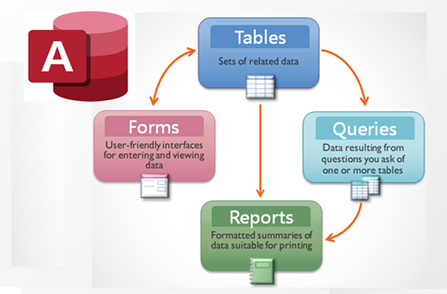
Microsoft Access is a step beyond Excel in terms of its ability to manage much larger amounts of data and maintain data consistency and integrity. It combines a robust relational database engine with a powerful software development environment in one package. Access offers a user-friendly tools to create complex queries, user interface forms and reports. It is supported by the VBA programming language which makes it possible to highly customize and automate Access and interoperate with other Office products, a variety of other code libraries and the Windows operating system. Another strong feature, one that makes Access very viable from a cost perspective, is the fact that it can be distributed as a runtime version. This means that once developed, an application can be distributed to an unlimited number of users who can run it without a license. In short, Access lets you create very powerful custom software at a relatively low cost compared to other systems.
I have been designing custom Access database solutions since 2002. In addition, I have many years of business process management experience. So I’m quite confident that I can design an Access solution that will meet both your operational and budgetary requirements.
Access ERP Integration
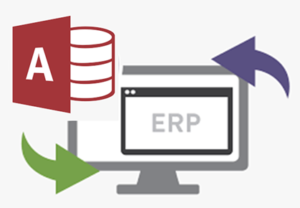
It is often true that even the best ERP system fails to meet all of a company’s requirements, Access also has a role to play in this scenario.
Access is a great environment for the development of ERP add-on solutions. ODBC is the protocol Access uses to connect to external data source and there third-party ODBC driver software products available that enable Access to connect to most of the major ERP systems and access their data. This enables Access to act as another front end to the ERP, one that can be customized using VBA code. In this way, custom utilities can be developed to add the missing functionality.
I have been combining ERP, Access, VBA and ODBC in add-on applications for years and have achieved great results. This model has enabled me to not only meet my client’s functional requirements but also significantly streamline their business processes.
Access as a Hub for Multiple Data Sources
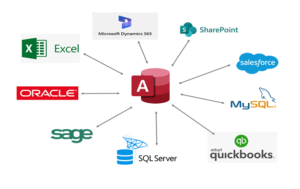
One of the best features of Access is that it can make live-linked connections to other systems using the ODBC protocol. This means that Access can act as a data-warehouse, a central repository where all your systems come together in one place for reporting and analysis purposes.
So for instance, imagine your organization has multiple business units, each one using a different accounting system. Access can make a live-linked connection to the tables in each one to retrieve up-to- the-minute information . A query could then be written to transform all the data into one one standard format and store it in a set of Access tables for consolidated reporting purposes. The same kind of thing could be done to combine CRM data in Salesforce with financial data in a Sage. And if the situation requires it, these combination programs can be run in batch mode overnight.
All that is needed to use Access in this way it is for each data source to be ODBC compliant, but that is true of practically all commercially available software these days.
Access and Excel Integration
I’m often asked which is better Access or Excel. The answer is that they are both very powerful, but in different ways, which is better depends your objectives and preferences.
Excel’s strength is in financial and statistical modeling, it has built-in functions that can many kinds of financial, statistical and scientific calculations. Access is better at storing, organizing and large amounts of data. Excel is very intuitive, flexible and relatively easy to use. Because it enforces very stringent data integrity rules access is much more difficult to use. Excel is far better at charts, graphs, dashboards and pivot tables, whereas Access is better for doing relational queries and has better forms and reports.
But the good news is you don’t need to choose between them! Access and Excel complement each other very well and I frequently use them together in the application I design. Excel can be a great front end for Access to take advantage of Access’s greater storage capacity, data integrity and relational querying capability. On the other hand, Access can call up Excel to use its more advanced formulas, and its analytic and visualization features. The key here is VBA, both products support the VBA programming language and you can use it to seamlessly integrate them and get the best each has to offer.
Access migration to SQL Server
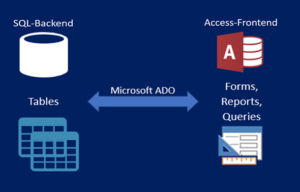
Over time, you may find Access is not able to keep pace with the growth of your business and you may want to consider migrating to SQL Server. What this means basically is replacing the Access “back end” data tables with tables in an MS SQL Server database. There are many benefits to be gained by this, these include improved performance, more robust security, unlimited concurrent users and the ability to use such database features as triggers, stored procedures and transaction logging that Access does not implement. This is a great option because it not only extends the capability but also the useful life of your system by allowing you to keep most of the same user interface forms, reports and queries, although some queries you may wish to rewrite as “pass-through” queries, queries written in SQL Server syntax, in order to optimize performance.
I have extensive experience developing SQL Server database applications and in upsizing Access to SQL Server, I’m a great proponent of this strategy because I’ve seen dramatic improvements in performance for those clients who have chosen to follow it.
Access Support Services

You may have an Access database in place that normally works fine, but may require occasional troubleshooting to fix bugs that suddenly appear or a degradation in performance. Or your business requirements may have change due to taking on a new customer or product line. Or you would like some new reports and queries written but lack the internal resources to do so.
I offer a full range of Access support services and I’m at the ready to help you, either on an as-needed or ongoing support basis. Contact me for a free consultation.